Merchant Services Account Sales
Description
What's in this article?
The Sales module in your Merchant Services account within Business Advantage 360 displays sales activity for a selected date range. You can access up to 18 months of sales data and choose either a custom date range or a preset range, such as Today, Last 15 Days, or Last 30 Days.
Sales data can be grouped by day, week, month, or year and filtered by specific fields to help you find the information you need. You can also view detailed sales information associated with each payment terminal ID.
The Sales module In your Merchant Services account in Business Advantage 360 online banking displays all sales within a selected date range. Up to 18 months of data is available to you. Custom date ranges can be set or preset ranges are available for selection (today, 15 days, 30 days). Data can also be grouped by days, weeks, months, or years and can also be filtered by field. You can view sales details associated with each payment terminal ID.
- To select a date range
- Select a date range from the dropdown list. You can select today, Last 7 days, Last 30 days, or choose a custom date range.
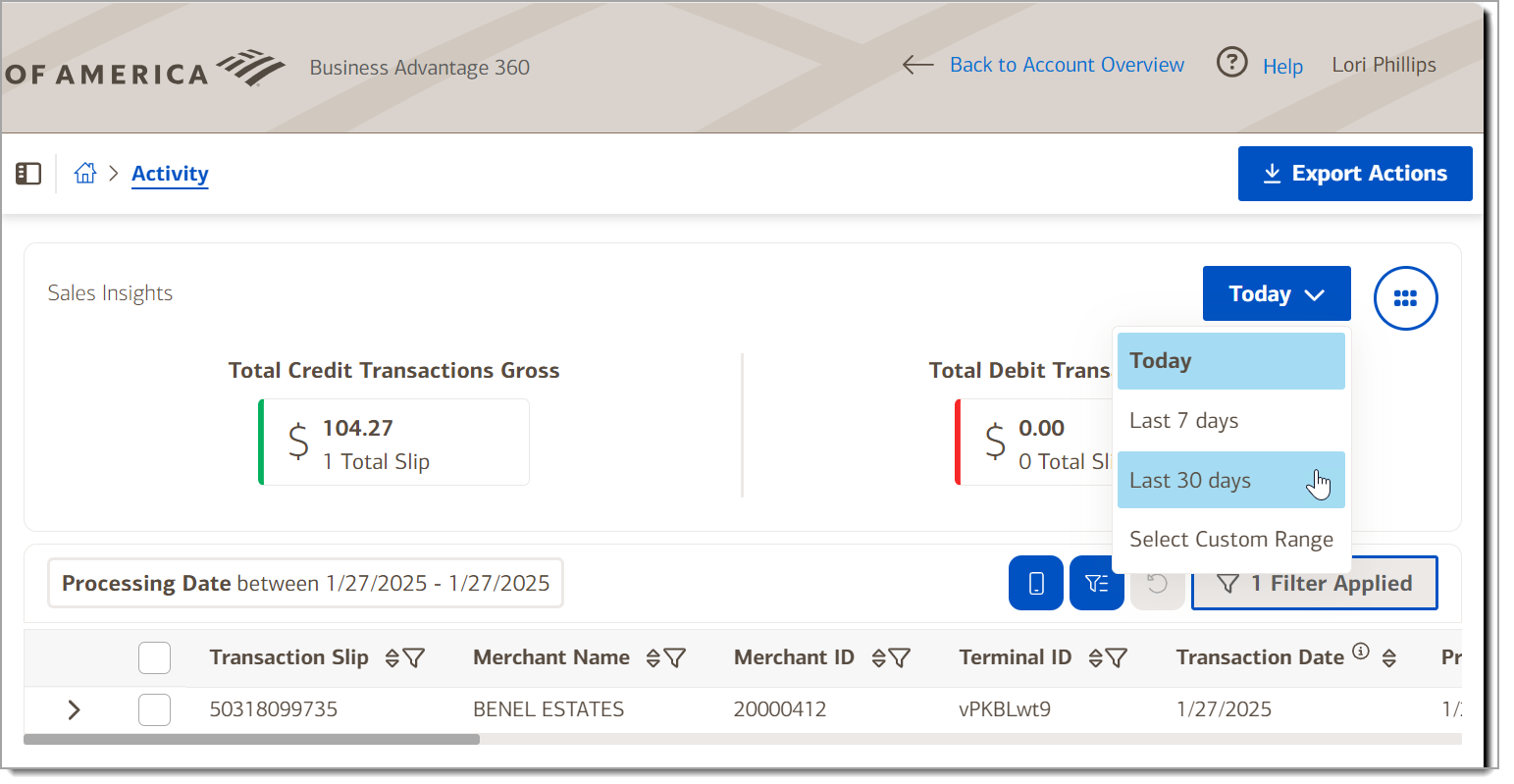
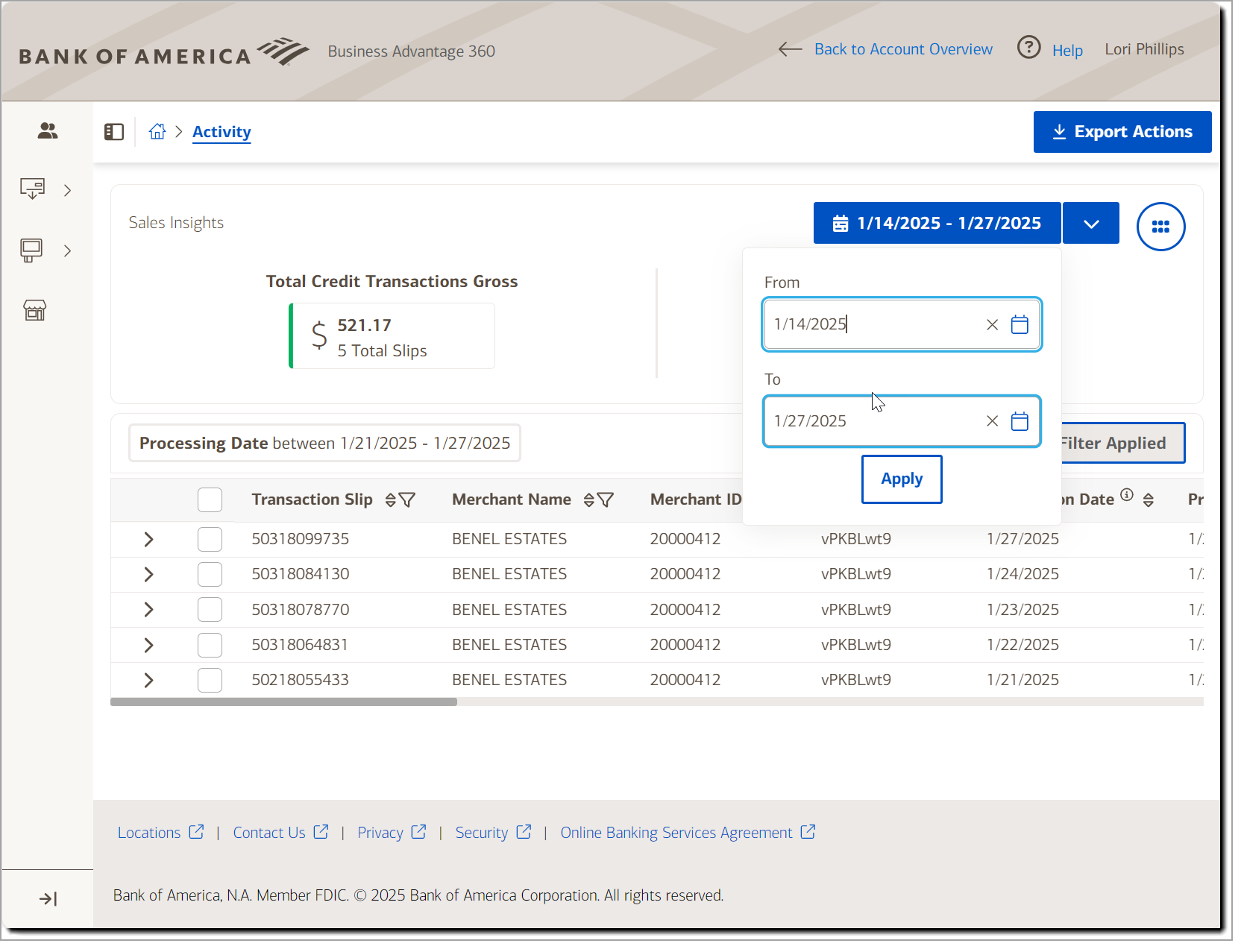
- Select a date range from the dropdown list. You can select today, Last 7 days, Last 30 days, or choose a custom date range.
- To add additional filters
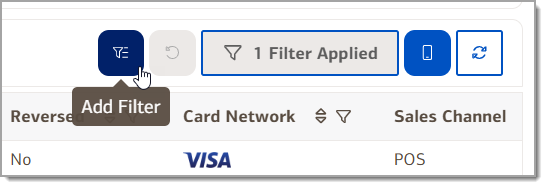
- Click Add Filter icon to add additional filters to the results.
- Choose a filter field from the dropdown list.
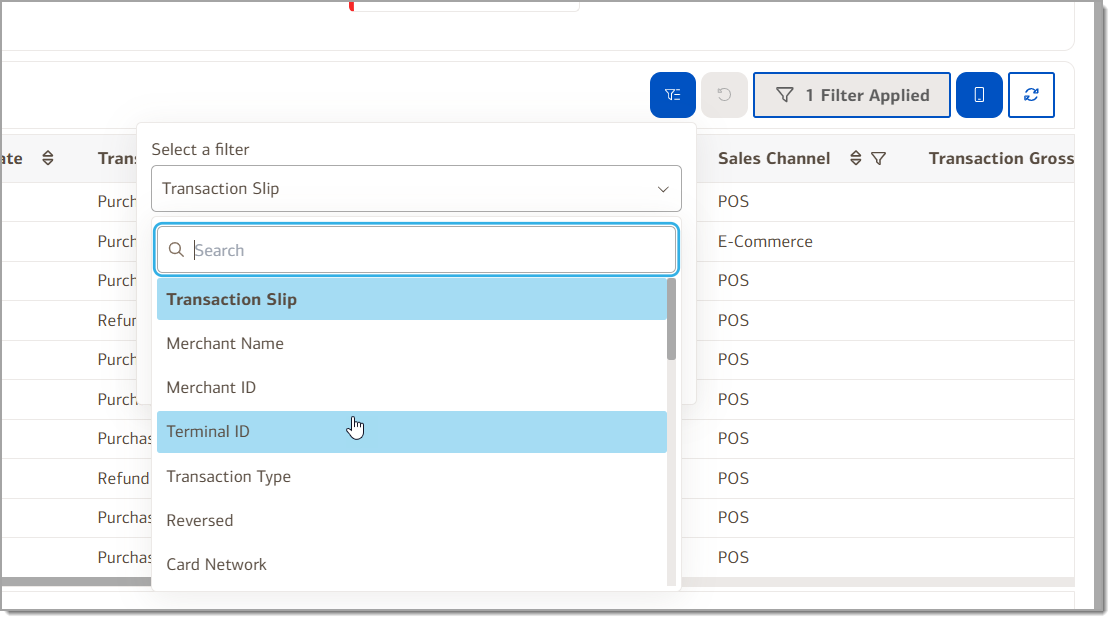
- Then choose a value to search for and click Apply Filters to view the results. For some filters, you may also be able to select whether match mode contains the value entered, is the value entered or is not the value entered. Filters can be also applied using the column filters. Click Clear All Filters to return to the original results.
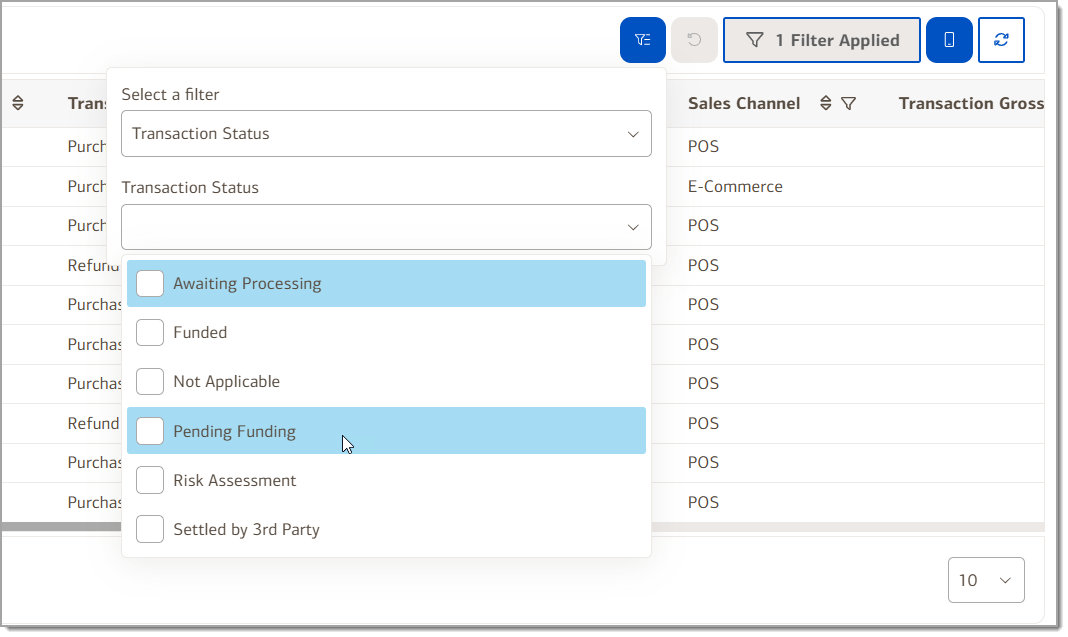
- Click Add Filter icon to add additional filters to the results.
- To toggle between scrollable and fixed columns
The filtered results for your date and filter selection can display as either a scrollable table or condensed to a single view.
- Click Toggle Scrollable Columns to switch between the two views.
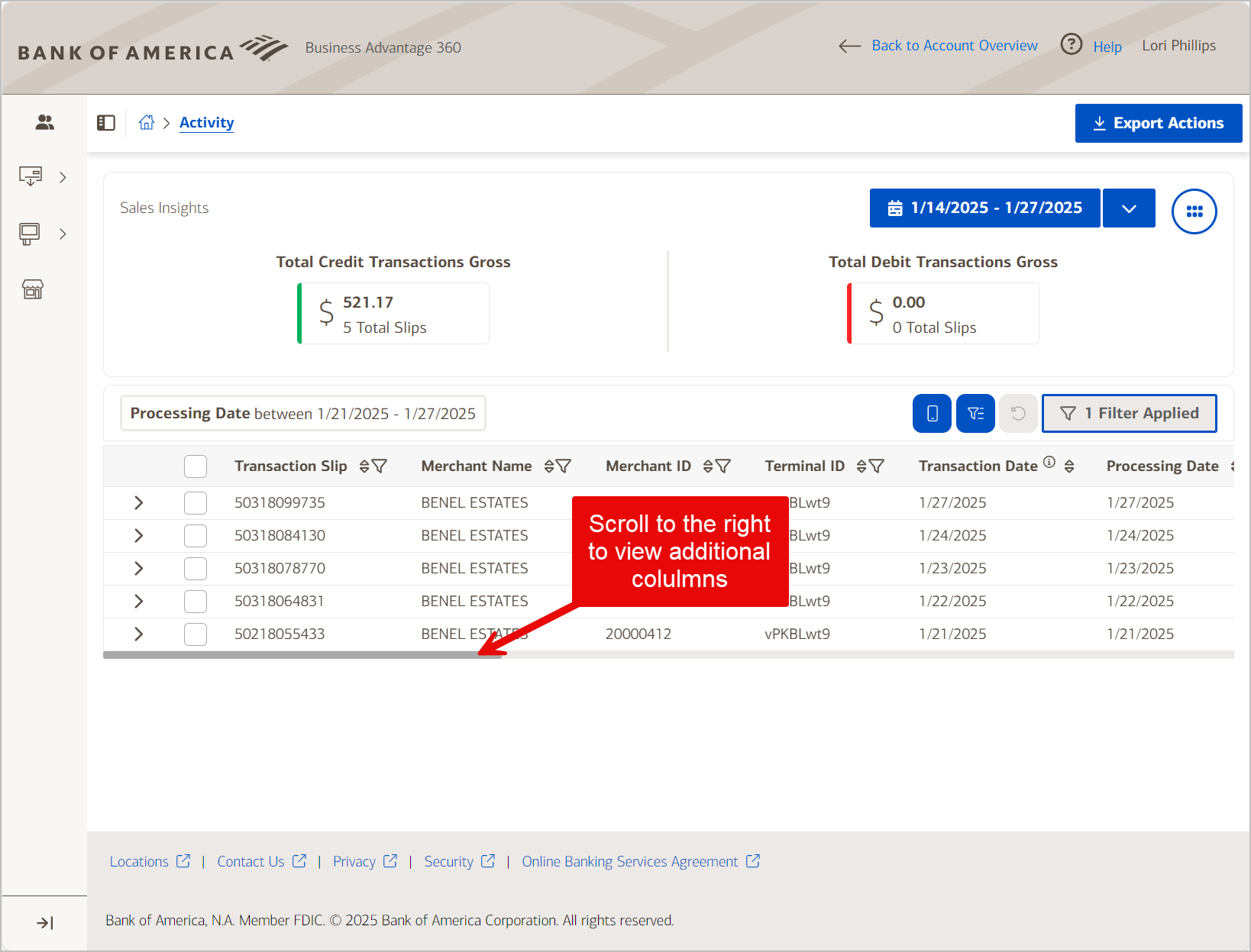
- Click Toggle Scrollable Columns to view condensed. Open the transaction view to see all columns and details.
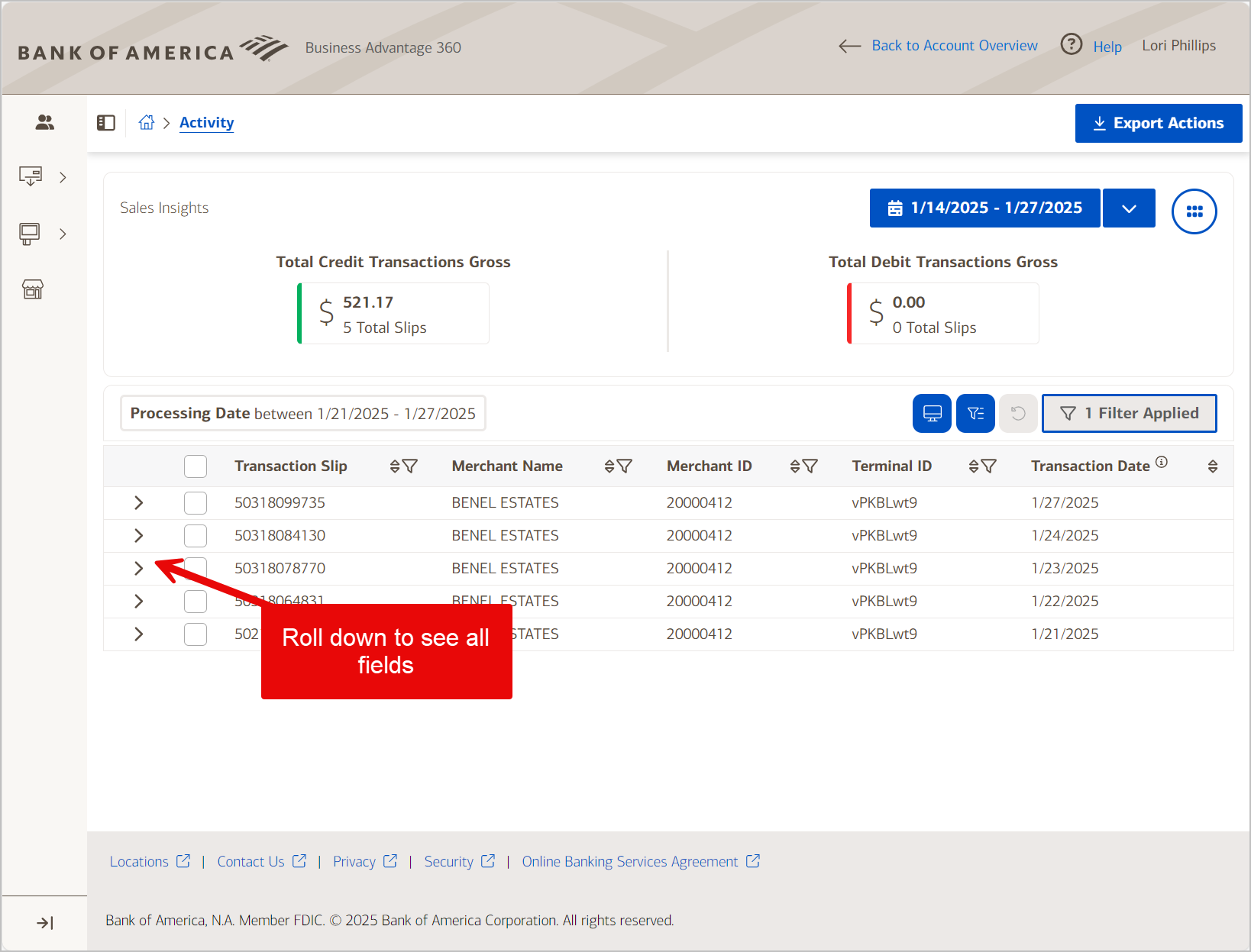
- Click Toggle Scrollable Columns to switch between the two views.
To export a report
- Select the report from the left navigation.
- In the top right corner, click Export Data.
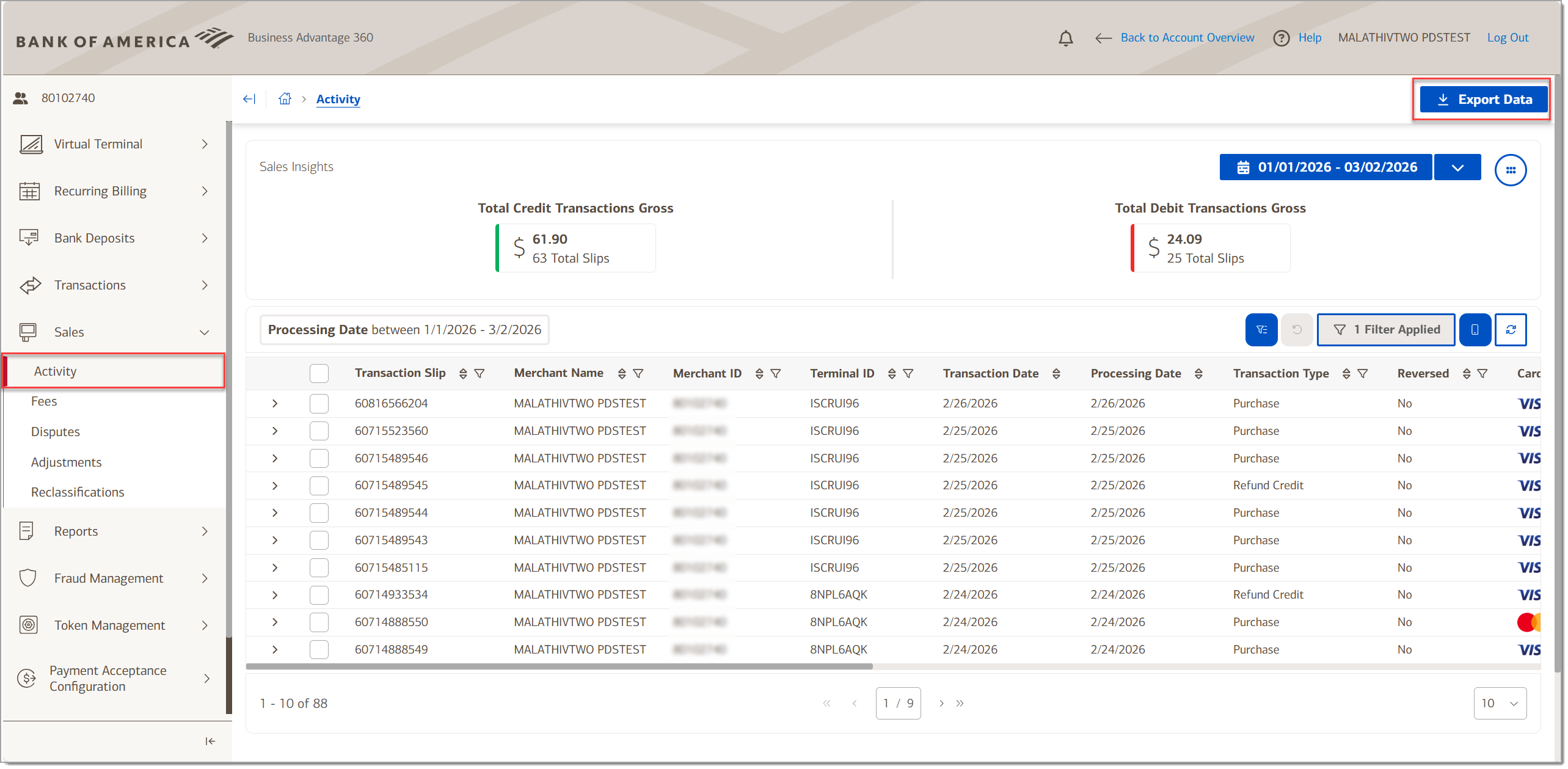
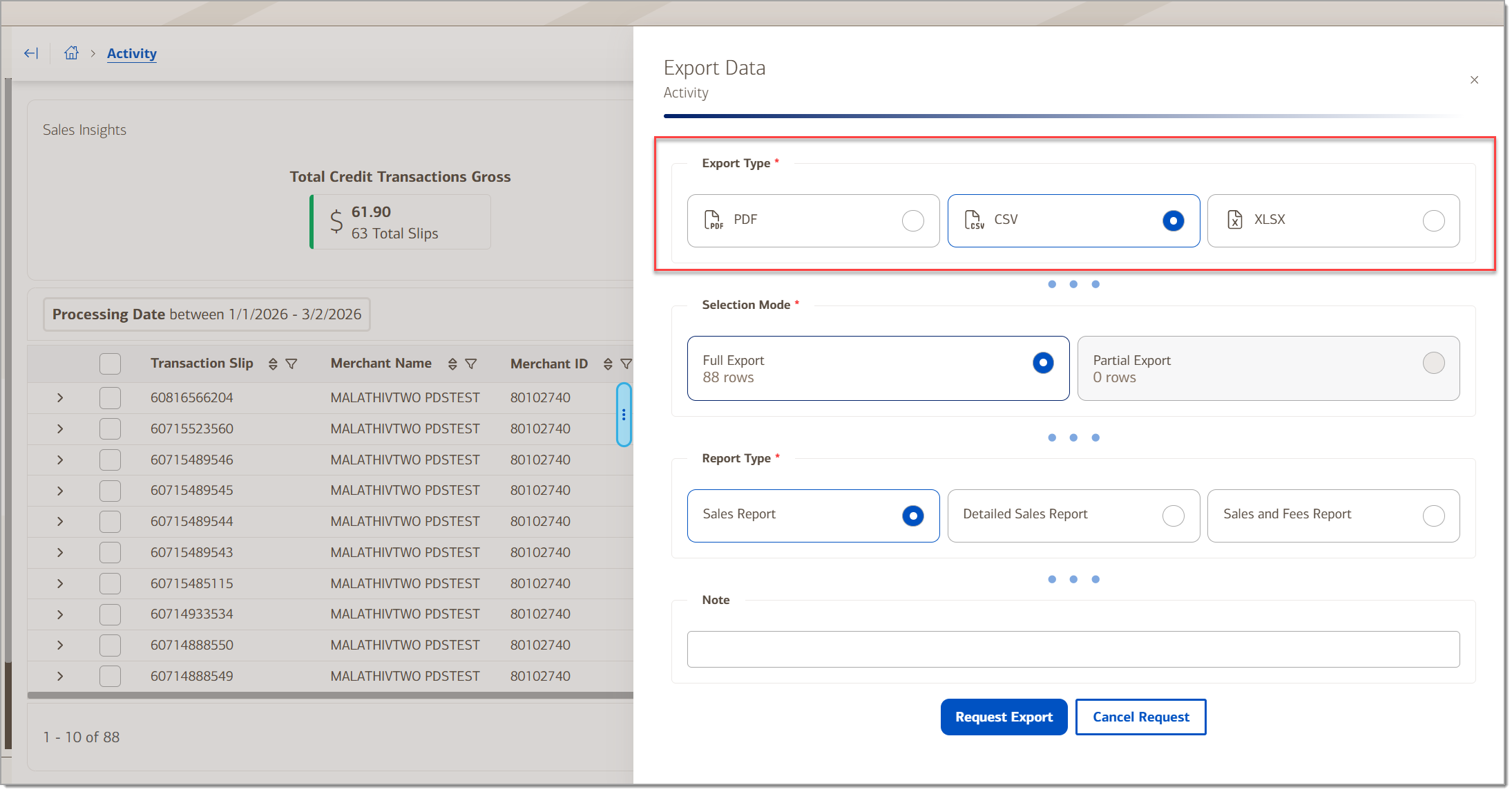
- Select an export format: PDF, CSV or XLSX.
- Select a report mode: full export or partial export.
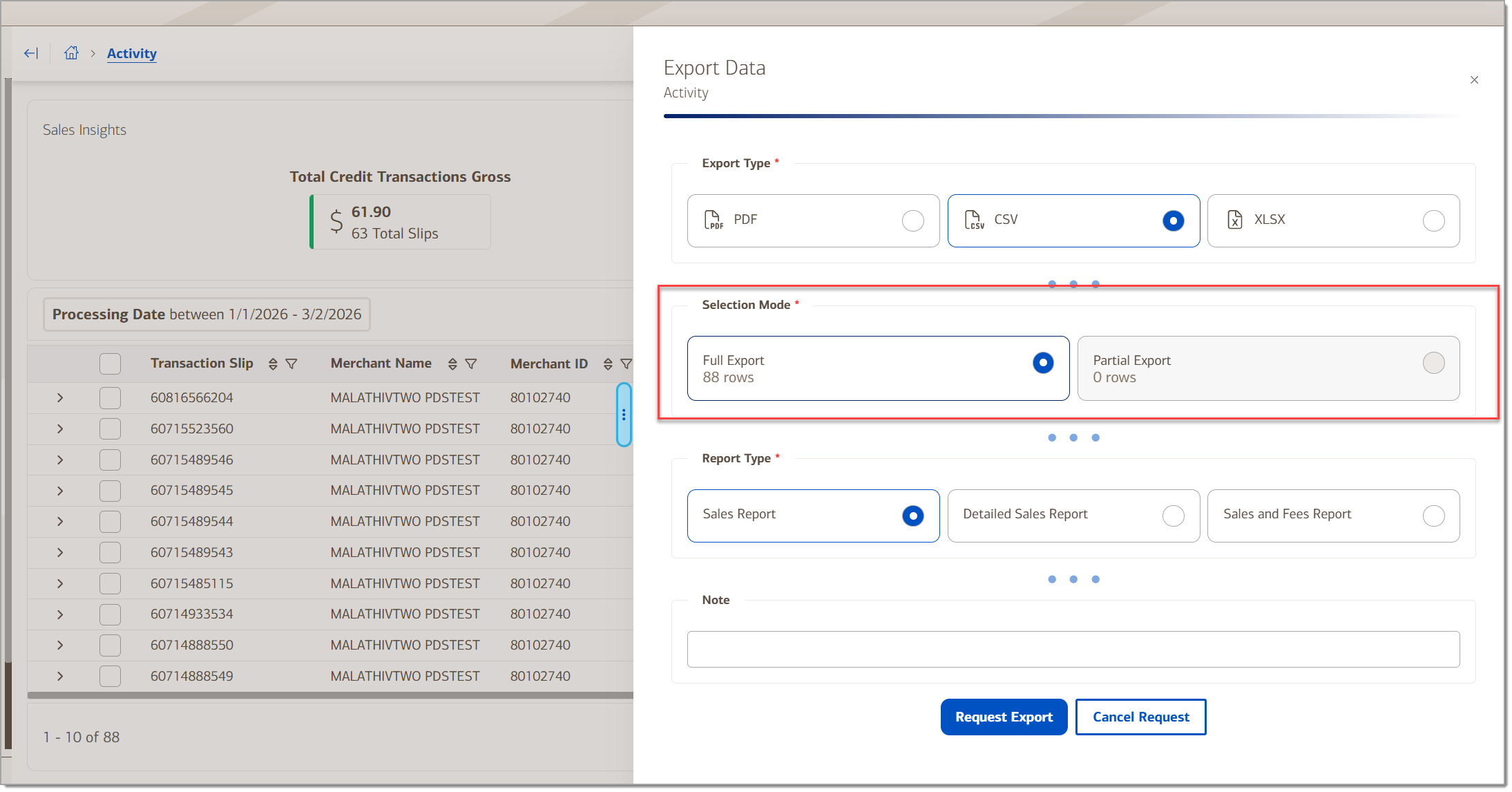
- Select a report type: Sales Report, Detailed Sales Report, or Sales and Fees Report.

- (Optional) Enter a note about the report, if desired.
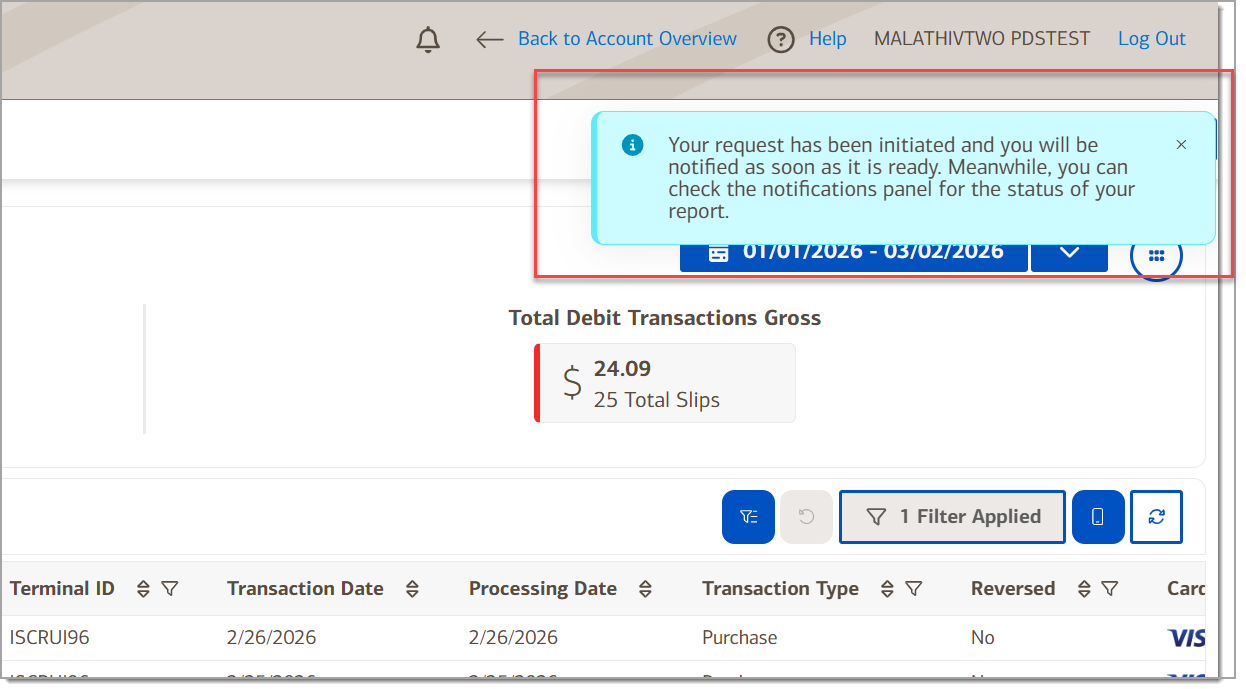
- Click Request Export. A message indicates that your request is initiated.
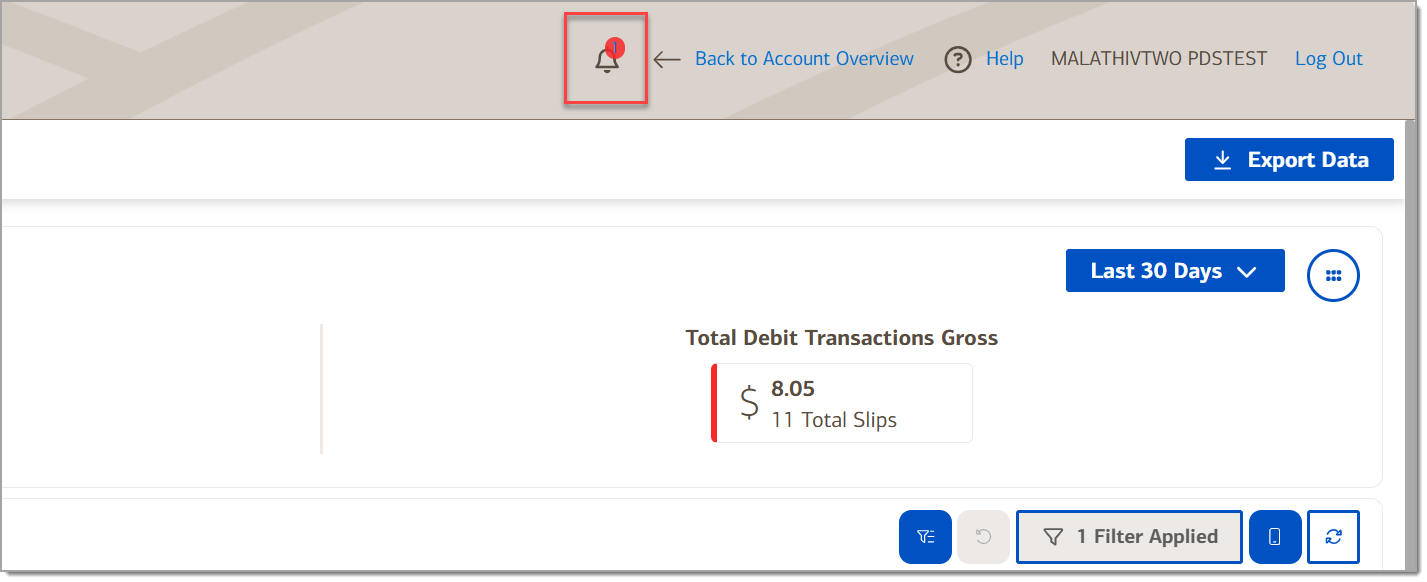
- Click the Notification bell icon when it displays a red dot indicating the report is ready. You may need to refresh your browser to see the notification.
- Select the report to roll down the status information.
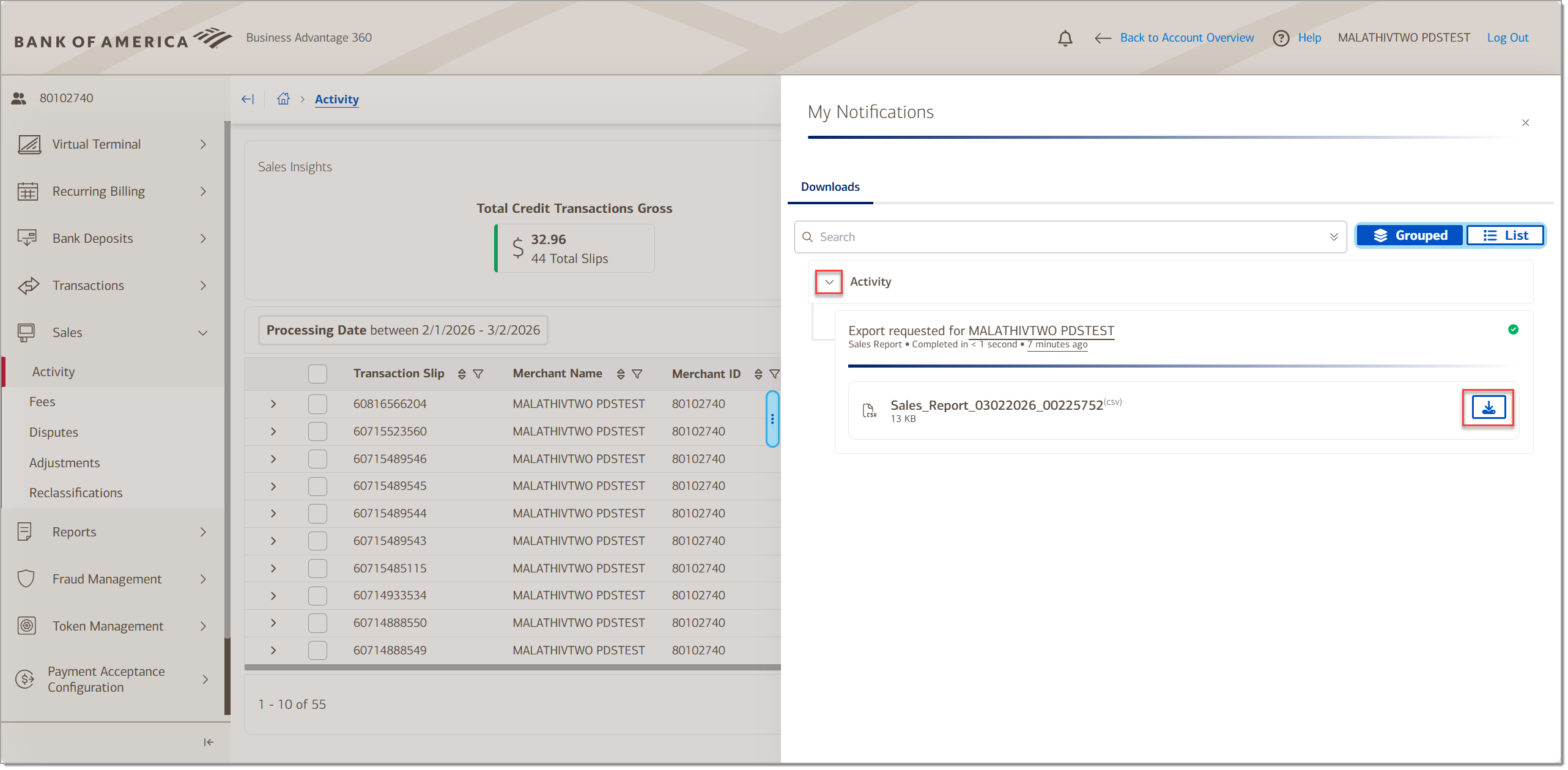
- In My Notifications, your report will be listed. Click the Download icon.
Activity
View sales activity within a selected date range. Total credit transactions gross and total debit transaction gross display at the top for the selected date range. If you are logged in at the relationship level for your account, you will be able to see activity for all locations. Roll down a transaction to view additional transaction detail. Click the column filter to search for specific criteria.
| Field | Description |
|---|---|
| Transaction Slip | Identification number for the transaction |
| Merchant Name | Merchant name |
| Merchant ID | Merchant ID (MID) |
| Terminal ID | The device terminal from where the transaction originated |
| Transaction Date | The date the transaction was created |
| Processing Date | The date the transaction was processed (settled) |
| Transaction Type | The type of transaction, such as a Purchase or Refund Credit |
| Reversed | Indicates whether the transaction was reversed, the transaction was canceled before it settled |
| Card Network | The credit card network symbol for the card network: Visa, Mastercard, Discover etc. |
| Sales Channel | Sales channel of the transaction: POS (point of sale), E-commerce or MOTO (mail order or telephone order) |
| Transaction Gross | The gross amount of the transaction before charges were removed |
| Transaction Charge | The fees charged to the transaction during settlement. This may be blank if the transaction status is still awaiting processing. This amount is an indicator and may not include all associated charges |
| Transaction Net | The net amount after charges. This amount is indicative and may not be a precise calculation. May be blank if the transaction has not yet settled |
| Transaction Currency | Only USD is supported |
| Account Type | The account type where the transaction posted, such as Payment Account |
| Transaction Status | The status of the transaction settlement - funded, awaiting processing, pending funding, risk assessment, settled by 3rd party |
| Payment Reference | A number assigned to a group of transactions submitted for settlement during a settlement window |
Transaction detail
| Field | Description |
|---|---|
| Transaction Time | The time of the transaction |
| Card Number | Cardholder card number with masked middle digits |
| Card Product | The card network, such as Visa, Mastercard, etc. |
| Card Type | Numeric code for the card type |
| Area of Event | Domestic |
| Capture Information | Transaction capture information at point of service. Indicates how the credit card information was captured at the point of sale |
| STAN | Identification number generated by the cardholder bank that can be used to trace a transaction |
| Summary Transaction Slip | Unique number assigned to a funding event, which includes all transaction, fees, adjustments, chargebacks, and other financial records that would be credited or debited to your account. Clicking the link will take you to the Payments module. |
| Service ID | Service ID |
| Issuer Country | Country where the card is issued |
| Auth code | Authorization code for the transaction |
| Retrieval Reference | The Retrieval Reference Number (RRN) for the transaction |
| Acquirer Reference | The Acquirer Reference number for the transaction |
| External Reference | The External Reference number for the transaction |
| Gratuity | The gratuity amount added to the transaction |
Fee Transaction Slip
If a transaction has been settled, the Fee Transaction Slip information will also be available.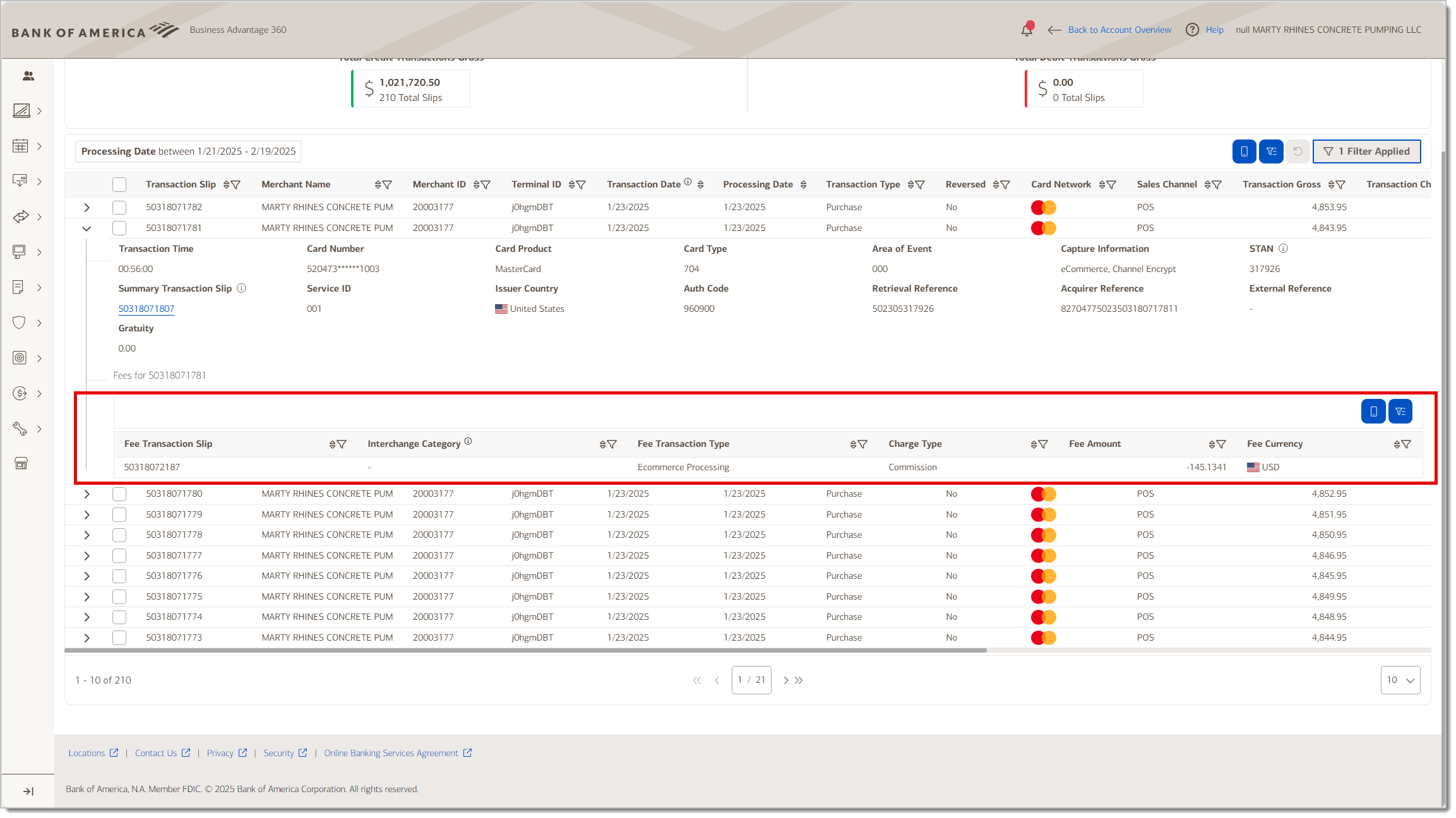
| Field | Description |
|---|---|
| Fee Transaction Slip | Fee transaction reference number |
| Interchange Category | Fee descriptor used for interchange fees |
| Fee Transaction Type | Credit, debit, etc. |
| Charge Type | Description of the fee |
| Fee Amount | Amount of the fee |
| Fee Currency | USD |
Fees
View fee activity within a selected date range that are not related to the original transaction activity, such as chargebacks, software fees, or similar fees. Total fees amount and the fee category that has the highest fee amount display at the top for the selected date range. If you are logged in at the relationship level for your account, you will be able to see fees for all locations.
| Field | Description |
|---|---|
| Transaction Slip | Unique fee transaction identifier |
| Merchant Name | Merchant name |
| Merchant ID | Merchant identification number |
| Processing Date | Date the transaction processed |
| Transaction Type | Textual description of fee as it will appear on the statement |
| Reversed | Whether the transaction was reversed |
| Fee Structure | Applicable fee structure |
| Fee Amount | Amount of the fee |
| Fee Currency | USD (United States Dollar) |
| Account Type | The account the fee is charged to, such as a dispute account or settlement account |
| Transaction Status | Whether the fee is pending or funded |
| Payment Reference | A reference number for the fee payment |
Disputes
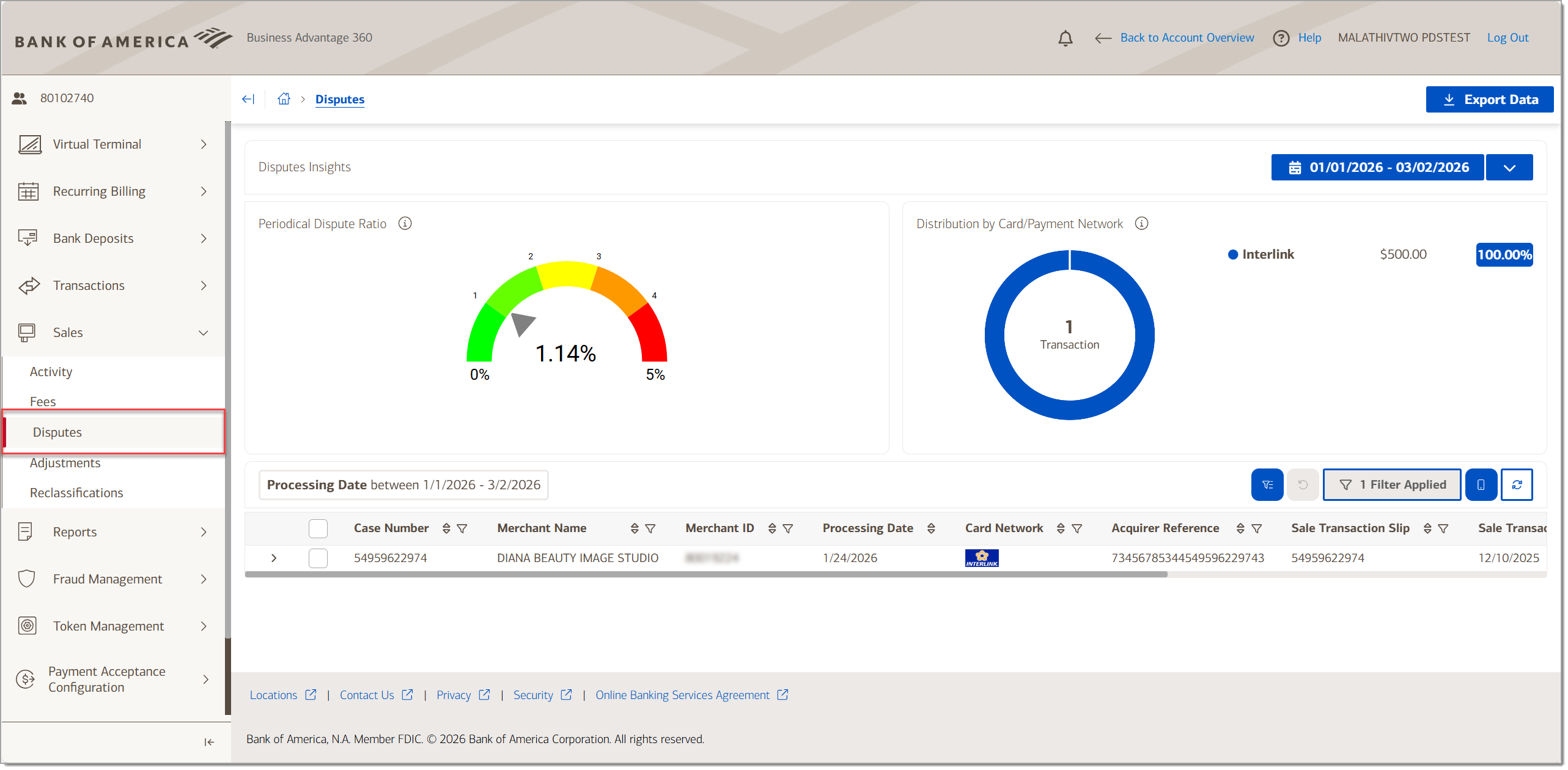
The Dispute activity includes a Dispute insights dashboard, with a gauge indicating the ratio of processed disputes against the processed sales for the selected date range. It will also show the distribution of disputes by Card/Payment network. shows dispute transactions posted to a Merchant Services account. This includes both chargeback and representment category transactions.
| Field | Description |
|---|---|
| Case Number | Dispute Management System case number. |
| Merchant Name | Merchant name |
| Merchant ID | The MID. Not applicable to every merchant, as non-member level clients do not have a MID |
| Processing Date | Date the transaction was processed for settlement |
| Card Network | Card network |
| Acquirer Reference | Reference number generated by BankWORKS |
| Sale Transaction Slip | Transaction slip number |
Dispute detail
View of disputed transactions.
| Field | Description |
|---|---|
| Sale Transaction Date | Transaction date |
| Sale Transaction Amount | Transaction amount |
| Sale Transaction Currency | USD |
| Card Numbers | Card number for the transaction |
| Terminal ID | Identifies which terminal performed the transaction |
| Sale Auth Code | Authorization code captured in sale |
| Sale Retrieval Reference | Retrieval reference number for the sale |
| Sale STAN | Identification number generated by the cardholder bank that can be used to trace a transaction |
| Transaction Slip | Transaction slip of original presentment |
| Processing Date | Transaction date of original transaction at point of service |
| Disputed Amount | Amount disputed for the transaction |
| Disputed Currency | Currency of the dispute |
| Account Amount | Account amount |
| Account Currency | Account currency |
| Account Type | Type of account |
| Reversed | Flags whether chargeback or representment is reversed |
| Transaction Status | Status of the transaction |
| Payment Reference | Reference number for the payment |
Adjustments
View adjustments to your account by date range.
| Field | Description |
|---|---|
| Transaction Slip | Unique identifier of chargeback or representment transaction settlement |
| Merchant Name | Name assigned to the merchant at boarding |
| Merchant ID | The Merchant ID is not applicable to every merchant; non-member level clients do not have a MID |
| Processing Date | Date the adjustment occurred |
| Transaction Date | Date of original transaction (based on posting date value at time of processing) |
| Transaction Type | Dispute type, i.e. retrieval request, first chargeback, pre-arbitration, etc. |
| Narrative | The reason for the adjustment |
| Reversed | The reversal flag of the chargeback/representment transaction |
| Adjustment Amount | Amount of the adjustment |
| Adjustment Currency | Adjustment currency |
| Account Type | Sub ledger account type |
| Transaction Status | Status of the transaction |
| Payment Reference | Reference number for the payment |
Reclassifications
An interchange reclassification refers to when a credit card transaction is moved from one interchange category to another because it didn't meet the criteria for its original classification. The reclassification may result in a higher fee for the transaction processing. Total credit reclassification gross and total debit reclassification gross for the selected date range display at the top of the page.
| Transaction Slip | Reference number for the transaction used to match the reclassification |
| Merchant Name | Name assigned to the merchant at boarding |
| Merchant ID | Merchant identification number |
| Processing Date | Date of reclassification of the transaction (based on posting date at time of processing) |
| Sale Transaction Slip | Transaction slip of original presentment |
| Sale Transaction Date | Transaction date of original presentment at point of service |
| Sale Transaction Gross | Original transaction amount of presentment |
| Sale Transaction Currency | Currency of the transaction |
| Card Number | Card number of the original transaction |
| Card Network | Card network or organization |
| Original Interchange Fee Identifier | Fee identifier of the original transaction |
| Adjusted Interchange Fee Identifier | Fee identifier of the reclassification transaction |
| Adjustment Amount | Amount of the reclassification adjustment |
| Currency | USD. Currency of the reclassification transaction |
| Account Type | The settlement account type: sales, fees, disputes, or third-party payment |
| Transaction Status | Status of the adjustment |
| Payment Reference | Reference number for the reclassification settlement transaction |