Getting Started with Point of Sale Solution Basics Plan
Description
What's in this article?
Congratulations on choosing Point of Sale solution! The Basics Software Plan is the base software option for the Point of Sale Solution. It includes estimates, invoicing, reporting, an integrated Virtual Terminal, QuickBooks® integration, basic inventory and employee management, discounts and multi-location management.
Get started setting up your Point of Sale Solution Basics Software Plan:
1 Log in to your Merchant Services account in online banking
Your Merchant Services account requires enrollment in Business Advantage 360, our small business online banking. Access your statements, protect your account with PCI Assist, and monitor for any potential disputes/chargebacks from your online banking account. Learn more about accessing Merchant Services in online banking.
2 Log in to Point of Sale Solution Back Office
The Point of Sale solution has a web-based back office, which you the power to run your business from anywhere by accessing up-to-the-minute data from any browser. Please check your email account for an email from “Bank of America…" with your login credentials. This email includes the enrollment link and your username.
To log in to Point of Sale Solution Back Office for the first time
- Click the link in your enrollment email.
TIP! If you did not receive your enrollment email, click here.
- Type in your username, which you will find in your email, and create a password.
- When prompted to complete a two-factor authentication, enter the code sent to the email you provided on file.
- Write down the new password as you will need it for future access.
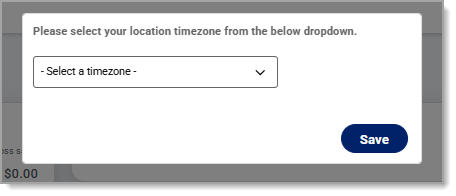
- Log in to the Back Office and complete the prompt to set up your location time zone.
You are now logged into the Back Office. For additional login assistance such as help with resetting a password, check out Point of Sale Solution Back Office Login.
3 Set up your business
When logged into the Point of Sale Solution Back Office, take a tour get familiar with the system and complete the tasks that are essential to your business:
4 Test a transaction
You are ready to test a transaction. Create an order using your Virtual Terminal to your test item.
5 Manage transactions and reporting
As you begin taking payments in Point of Sale Solution, you can view and manage transactions, including reviewing transactions that have been flagged as potentially fraudulent. Review the reports that are available on the Basic Plan to help you manage your business.
You may receive a chargeback or dispute related to a transaction. Monitor for disputes through your Merchant Services account in online banking and respond to them promptly. Your monthly statements will also be available within the online banking Merchant Services account.